
What is imunify360?

It is a comprehensive security solution designed specifically for Linux-based web servers. It offers a suite of features aimed at protecting servers from a wide range of cyber threats.
With advanced malware detection and removal capabilities, Imunify360 scans servers for malicious files and code, promptly quarantining or removing them to prevent further damage. Its Intrusion Detection and Prevention System (IDPS) monitors server traffic in real-time, blocking suspicious activities and potential intrusion attempts. The Web Application Firewall (WAF) protects web applications from common vulnerabilities and attacks, such as SQL injection and cross-site scripting.
Utilizing proactive defense mechanisms powered by machine learning, Imunify360 can detect new and emerging threats, automatically blocking malicious IP addresses and user agents. Additionally, it maintains a reputation database of known malicious IPs and domains, effectively blocking access from blacklisted sources.
It offers a centralized management dashboard, allowing administrators to monitor security events, view reports, and configure settings across multiple servers from a single interface. While it provides comprehensive protection, users should consider potential resource consumption, cost, and the possibility of false positives when implementing Imunify360 on their servers.
Features of Imunify360

- Malware Detection and Removal:
- It employs advanced malware scanning algorithms to detect and remove malicious files and code from servers. It can automatically quarantine or remove infected files to prevent further damage.
- Intrusion Detection and Prevention System (IDPS):
- The IDPS feature monitors server traffic and identifies suspicious activities or patterns that may indicate a potential attack. It helps block intrusion attempts and protects against common web application vulnerabilities.
- Web Application Firewall (WAF):
- It includes a robust WAF that filters and inspects HTTP/HTTPS traffic to block malicious requests and prevent common web application attacks such as SQL injection, cross-site scripting (XSS), and directory traversal.
- Proactive Defense:
- The Proactive Defense feature uses machine learning algorithms and heuristics to detect new and emerging threats in real-time. It can identify patterns of malicious behavior and automatically block suspicious IP addresses or user agents before they can compromise the server.
- Reputation Management:
- It maintains a reputation database of known malicious IPs and domains. It leverages this information to block access from blacklisted sources and reduce the risk of malicious activity.
- Centralized Management:
- It provides a centralized dashboard where server administrators can monitor security events, view detailed reports, and configure settings across multiple servers from a single interface.
Overall, Imunify360 helps enhance the security posture of Linux-based web servers by providing a comprehensive suite of protection mechanisms and proactive defense capabilities against evolving cyber threats.
Pros of Imunify360

- Comprehensive Protection:
- It offers a wide range of security features, covering malware detection, intrusion prevention, and web application firewalling.
- Real-time Defense:
- Its proactive defense mechanisms can identify and mitigate threats in real-time, minimizing the risk of server compromise.
- Easy Integration:
- Integrates seamlessly with popular web servers like Apache and NGINX, requiring minimal configuration to deploy.
- User-friendly Interface:
- The centralized management dashboard provides an intuitive interface for administrators to monitor and manage server security.
- Regular Updates:
- It is regularly updated with new threat intelligence and security patches to stay ahead of emerging threats.
Cons of Imunify360
- Resource Consumption:
- It may consume system resources, particularly during malware scans and intensive security operations, which could impact server performance.
- Cost Consideration:
- While offering comprehensive security features, It is a paid solution, which may be a consideration for smaller organizations or individuals with limited budgets.
- False Positives:
- Like any security solution, It may occasionally flag legitimate activities as suspicious, leading to false positives and potential disruptions to normal server operations.
- Limited OS Support:
- It primarily targets Linux-based servers, so it may not be suitable for organizations running other operating systems.
Despite these considerations, It remains a popular choice for organizations seeking robust server security solutions, offering a balance of features, performance, and ease of use.
How to use Imunify360 in cpanel?
Accessing through Dashboard: Once installed, you can access the Imunify360 dashboard through your cPanel interface. It usually appears as an icon or link within cPanel, depending on your hosting provider’s configuration.
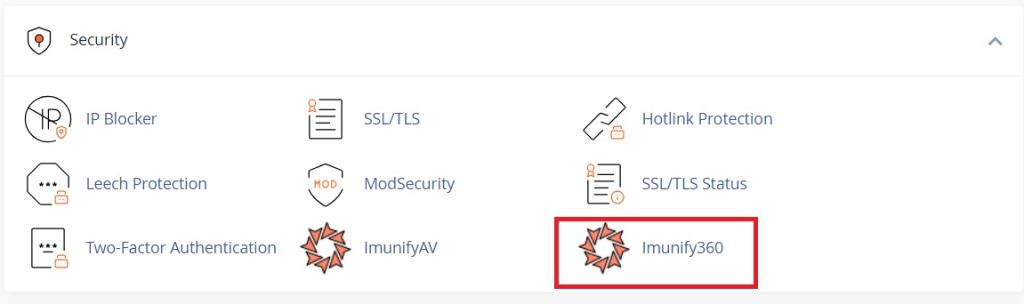 Navigating Imunify360 Features: Inside the Imunify360 dashboard, you’ll find various features and settings for managing security aspects of your server. This includes options for malware scanning, firewall configurations, and security settings.

Configuring Security Settings: Depending on your requirements, you can configure security settings such as malware scanning schedules, firewall rules, and blacklist/whitelist management within the Imunify360 dashboard.
Monitoring Security Events: It provides logs and reports for monitoring security events on your server. You can review logs to identify potential threats, view blocked IP addresses, and analyze security incidents.
Regular Updates and Maintenance: Ensure that Imunify360 is regularly updated to the latest version to stay protected against emerging threats. Most hosting providers manage updates automatically, but it’s essential to verify that updates are being applied regularly.
If you encounter any issues or require assistance with Imunify360, you can refer to the documentation provided by your hosting provider or directly contact their support team for guidance.